Personalized and Localized Learning: A “Just For Me” Planning Workflow (K–12)
Personalization and localization drive engagement, but they’re hard to scale because the work is inherently specific—and teacher time is limited. Differentiation isn’t “25 different lessons”; it’s one shared goal with intentional choices in content, process, or product. Curriculum Genie streamlines the workflow by turning local context, student interests, and standards/PoG priorities into editable units and lessons (with built-in inclusion supports), so Personalized Instruction becomes repeatable without eating up weekends.
Why Personalization and Localization Feel Hard to Scale
Many educators have long been good at reading the room: noticing what students care about, what a community values, and what local culture can offer as a hook for learning. But what works in one place won’t automatically work in another. A community’s point of pride—like a local festival or landmark—can be deeply meaningful to students nearby and completely uninteresting to students elsewhere. That’s the core tension of localization: it’s powerful precisely because it’s specific.
At the same time, differentiation is still widely experienced as difficult to implement. In the session, a statistic is shared that 80–83% of teachers say differentiation is somewhat or very difficult—often because it’s misread as “25 different lessons for 25 different students.” In practice, differentiation can be much lighter weight: offering choices in what students learn, how they learn, or how they show learning—without abandoning shared goals.
Differentiation does not mean 25 separate lesson plans. It means a shared goal with intentional variation in content, process, or product—so more learners can reach the same target through different paths.
The bottleneck isn’t whether teachers believe in relevance or Differentiated Instruction. The bottleneck is workflow: generating good ideas quickly, aligning them to a Standards-Aligned Curriculum and supporting Adaptive Learning pathways without turning planning into an all-weekend task.
Framework: A Practical Personalization Workflow (Tool-Agnostic)
This workflow is platform-agnostic. Curriculum Genie is shown as an example, but the core moves—local context + student interests + standards/PoG alignment + editable distribution—apply regardless of tool.
Curriculum Genie is positioned as an AI Curriculum Generator for educators who want faster, more flexible Instructional Design—while keeping humans firmly in the loop. Instead of treating Generative AI for Education as a worksheet machine, it supports a more strategic workflow: draft a Unit Plan, localize it, connect it to standards and competencies, then refine it based on what your students actually need.
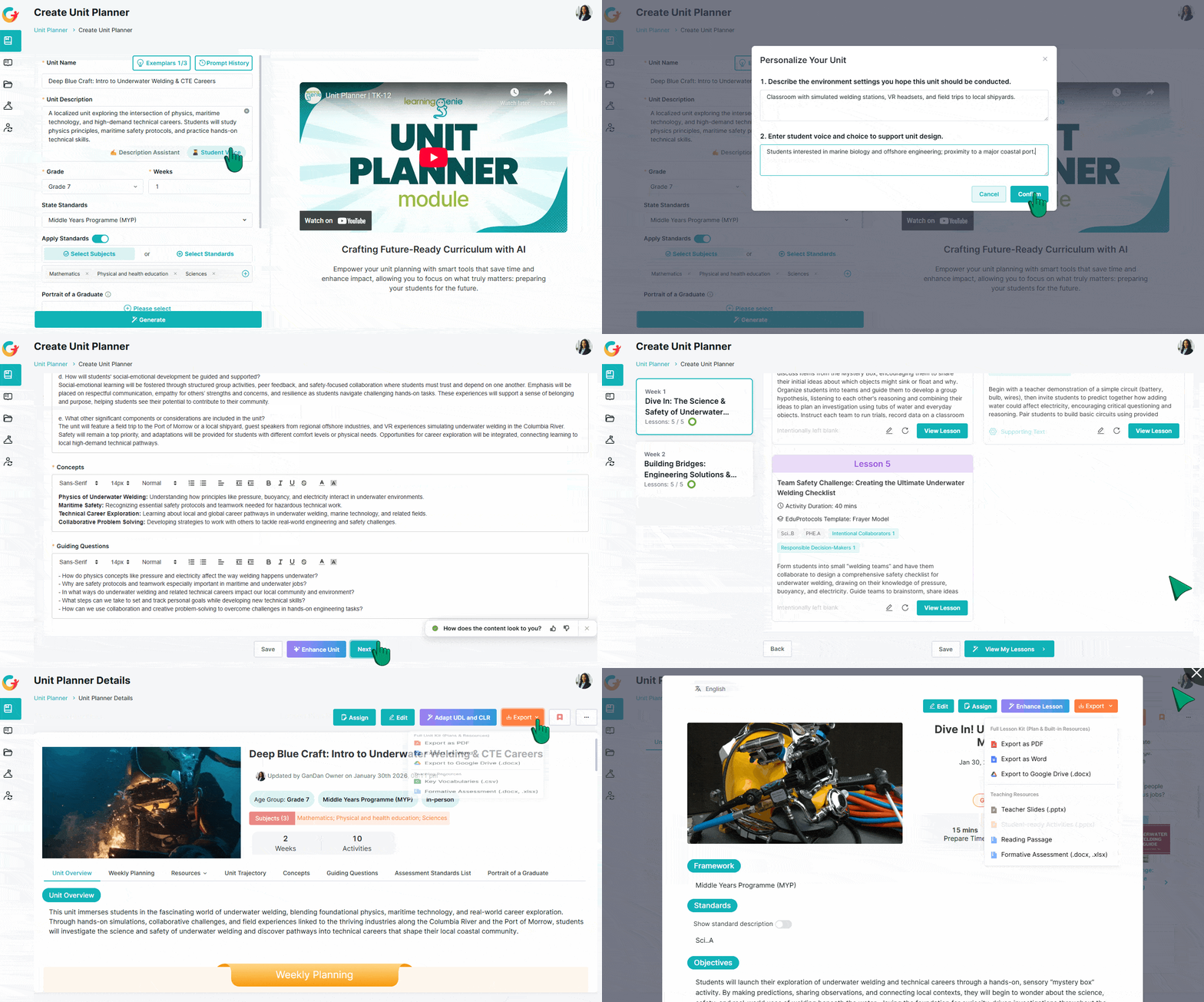
In the live build shown during the session, Curriculum Genie is used to create a short, localized Career and Technical Education (CTE) pathway unit for seventh grade. The topic is intentionally unconventional—underwater welding—chosen by the group to prove a point: when teachers don’t already have background knowledge (or ready-made materials), AI-Powered Lesson Planning becomes a practical way to “bring AI to the table” for idea generation, structure, and first drafts.
That same workflow maps to what many curriculum teams need today: faster planning cycles, more consistent alignment, and fewer tradeoffs between personalization and feasibility. Use this unit-planning walkthrough to replicate the workflow with your own topic and location.
Turning “Just For Me” Into a Repeatable Unit Plan
The session frames personalization as closer to tailoring than reinventing: you don’t need a totally different suit—small, intentional adjustments can change how learning feels. Curriculum Genie supports that approach by letting educators start with a coherent draft, then tune it for relevance and choice.
A key conceptual anchor is that differentiation can happen across content, process, and product. In practical classroom terms, that can mean giving students controlled choice (for example, choosing a specific topic within a shared theme, or selecting how they will demonstrate learning). Rather than forcing teachers to handcraft multiple parallel tracks, Curriculum Genie helps produce a baseline structure that still leaves room for student agency—supporting Student-Centered Learning and Personalized Learning without breaking shared targets.
Another thread woven into the discussion is culture: personalization is not only about “fun hooks,” but also about identity and the ways students make meaning. The session references the idea that culture functions like “software for the brain’s hardware”—a reminder that relevance includes students’ backgrounds, not just trends.
In practice, many educators begin by gathering student interest data (paper surveys or Google Forms were named) and then using those signals to make instruction more connected. This co-creation approach shows how to turn student input into usable curriculum decisions. Curriculum Genie complements that workflow by reducing the “creative connection” burden when it’s time to turn interests and local context into an actual Lesson Plan sequence.
A Concrete Example: A Localized CTE Pathway Built in Minutes
To demonstrate what this looks like end-to-end, Curriculum Genie is used to generate a two-week introductory unit on underwater welding for seventh graders, localized to Santa Barbara. The unit overview includes key concepts such as buoyancy, pressure, electrical conductivity in water, safety, and marine engineering connections—then breaks learning into a week-by-week trajectory with lesson-level materials.
Crucially for curriculum leads, the build also highlights alignment and coherence work that typically slows teams down. The unit is shown tying into ELA and science standards, with the option to map to a district Scope and Sequence—an important bridge between “cool idea” and implementable Curriculum Mapping.
The demo also spotlights how broader district goals can be embedded into daily instruction. The unit is generated with selected Portrait of a Graduate (PoG) traits—such as “critical thinker”—and provides lesson-level guidance for what that competency can look like in class (for example, prompting students to consider alternative explanations during discussion). This moves Graduate Competencies and 21st Century Skills from posters on the wall into daily teacher moves.
Finally, the build emphasizes inclusion supports. The lesson guidance includes references to Universal Design for Learning (UDL) as well as supports for IEP and English language learners, positioning these considerations as part of the planning output rather than an afterthought.
A practical distribution detail is also highlighted: materials can be exported to Google Drive in organized folders, including generated slides. Here’s how teachers create or adapt lesson plans with AI and keep materials shareable. For many teams, that “last mile” matters—because planning isn’t finished when a unit exists; it’s finished when teachers can access and use it with minimal friction.
Keeping Humans in the Loop—Especially When AI Defaults Don’t Match Your Pedagogy
The session also names a real concern: AI tools can carry pedagogical bias toward teacher-centered approaches that minimize student voice. The response offered is operational, not philosophical: educators need to recognize those defaults and actively steer outputs by editing, regenerating, or prompting for different approaches. If a tool can’t be moved away from overly traditional patterns, teams can either modify the output manually or choose another tool.
That “human judgment” theme appears again in classroom examples around chatbots. A teacher shares that student conversational practice can drift beyond intended vocabulary and grammar—another reminder that AI outputs need professional oversight. Curriculum Genie is presented in that same spirit: fast drafting and structure, followed by educator review for grade-level fit, pedagogy, and local appropriateness.
And there’s an explicit warning against shallow adoption: using AI purely as a worksheet generator misses the larger opportunity. The goal described is to “maximize humanity”—to keep students thinking, offer more perspectives, and create learning moments that are memorable rather than generic.
What This Means for Teachers and Curriculum Leaders Right Now
- You can treat personalization as a set of small, high-impact adjustments—without turning differentiation into separate parallel curricula for every student.
- You can generate a standards-connected Unit Plan quickly, then spend your limited time improving instructional quality rather than building structure from scratch.
- You can embed Portrait of a Graduate (PoG) competencies into lesson-level practice, making PoG Skills visible in daily instruction.
- You can support teacher teams with exportable, organized materials (including slides) that reduce implementation friction.
- You can keep student voice central by using the draft as a starting point—and then inviting students to suggest customizations and directions for inquiry.
Personalization works best when it’s local, specific, and owned by the learners in front of you. Curriculum Genie is designed to make that level of relevance more feasible—so educators can focus less on building blank-page plans and more on shaping learning that fits the students they actually teach.
Frequently Asked Questions
Curriculum Genie helps you start with a complete draft Unit Plan and lesson sequence, then adjust for differentiated content, process, or product without rebuilding everything from scratch. That makes it easier to offer student choices while keeping shared goals and structure intact.
Curriculum Genie can generate units using local context you provide (for example, a specific city or regional industry) so examples, applications, and prompts are grounded in students’ surroundings. You can then edit and refine the output to match what your students care about most.
Yes. Curriculum Genie can produce a Career and Technical Education (CTE)-themed unit that also references ELA and science standards, helping teams design cross-disciplinary instruction that still aligns to a Standards-Aligned Curriculum.
Curriculum Genie allows you to include Portrait of a Graduate (PoG) traits (such as “critical thinker”) in the unit build and provides lesson-level guidance for how those competencies can be practiced during classroom activities. This helps translate broad Graduate Competencies into observable student work and discussion routines.
Ready to Transform Your District?
Schedule a Demo with Curriculum Genie to see how Agentic AI can support your curriculum goals.